
 AsyaTicari
 AsyaRestoran
 AsyaOtel
 AsyaCrm
 AsyaKlinik
 AsyaSpor
 AsyaSSH
 AsyaEmlak
 AsyaFilo
 AsyaPuantaj
 AsyaİSG
 AsyaİHD
 Kolay Öğren
AsyaEmlak · Definitions
Code templates
Code template definition that builds account, item and service codes level by level (main group, sub-group, brand…) plus a sequence number.
On the Code templates screen you define how codes of account, item and service cards are built. The code is the concatenation of the parts chosen at each level (e.g. GD + SUT + sequence number 001 → GDSUT001). On the card you only choose from the levels; the code is not typed by hand.
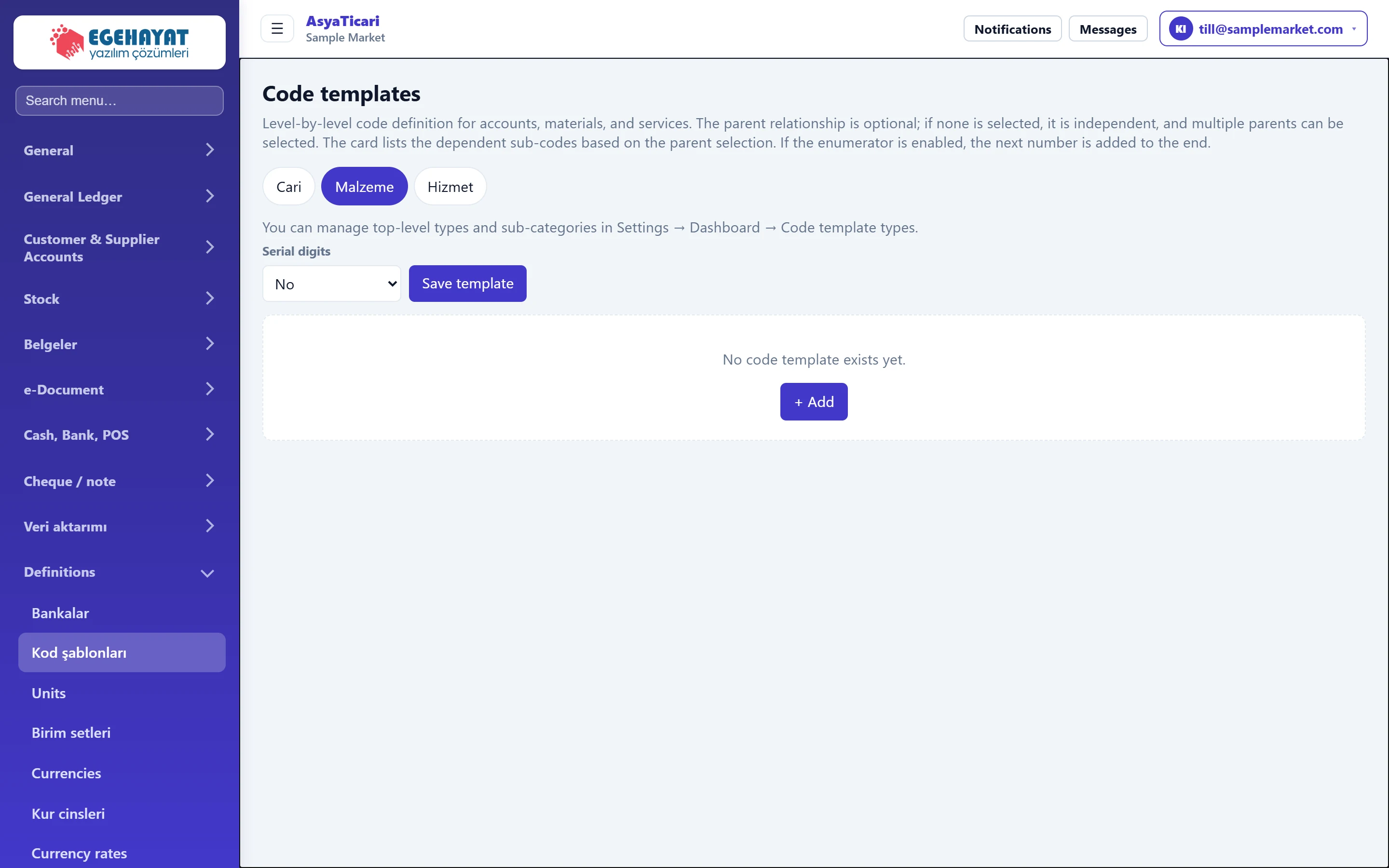
- 1Card type Card type whose template you edit: Account, Material, Service.
- 2Counter digits Number of digits of the sequence number added to the end of the code.
- 3Save template Saves the levels and settings.
- 4+ Add Opens the first level.
Card type and counter
- Choose the card type whose template you edit from the tabs at the top: Accounts, Material, Service. If sub-types are defined (e.g. «Fabric» under items), a second row of tabs appears; parent types and sub-types are managed under Settings → Control panel → Code template varieties.
- Serial digits is the number of digits of the sequence number added to the end of the code. With «No» no number is added; with 3 the screen shows «Example: …001».
- Save template saves the level settings and the counter.
If there is no template yet, an + Add button in the middle opens the first level.
Level panel
Each level sits in its own collapsible panel. The header shows the level name and the number of codes; + Add adds a row to this level, Delete level deletes the level with its linked sub-codes.
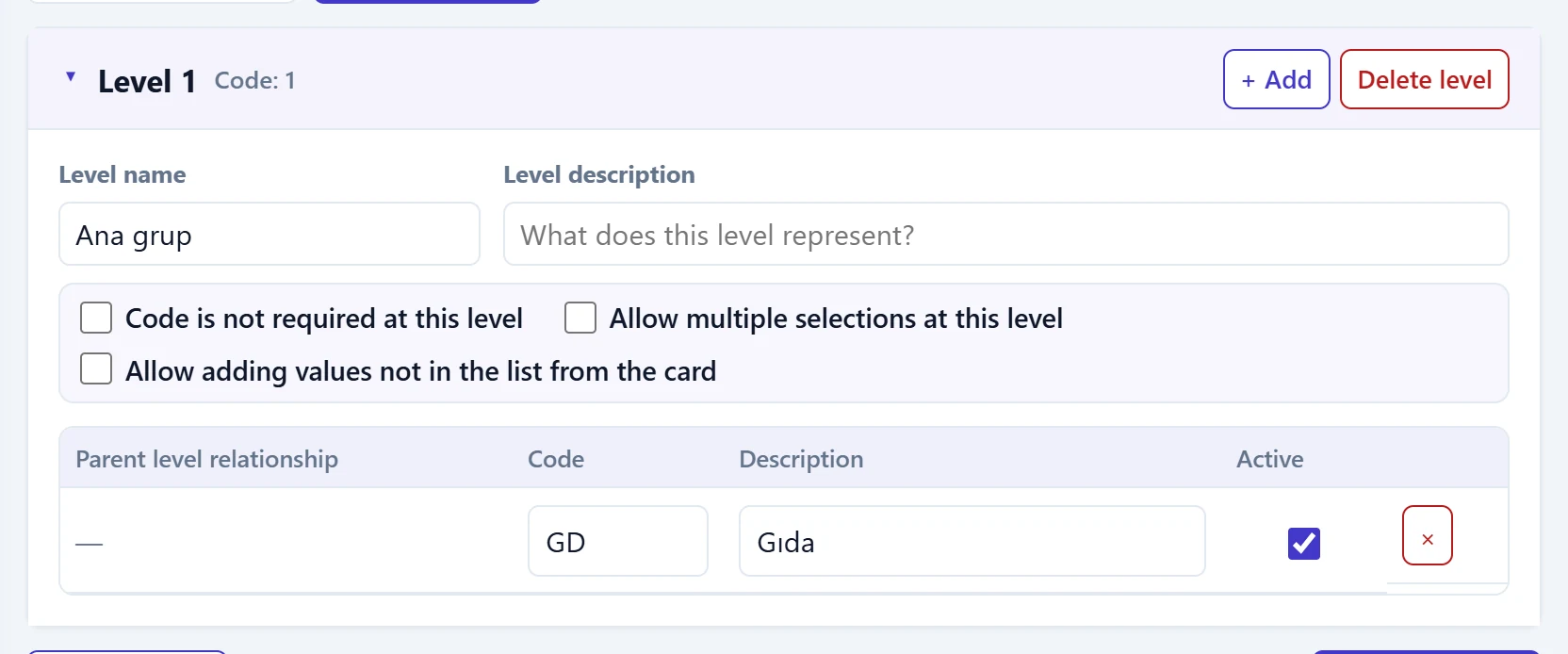
- 1Level header Click to collapse / expand; the number of codes is on the right.
- 2+ Add Adds a new code row to this level.
- 3Delete level and associated sub-codes Deletes the level and its linked sub-codes (asks for confirmation).
- 4Code row Code, description and active flag. Saved automatically when you leave the row.
| Field | Sign in | Description |
|---|---|---|
| Level name | Text | Level name (e.g. «Main group», «Brand»). If empty, «Level 1» is shown. Placeholder: «Level 1» |
| Level description | Text | What the level stands for; shown as a hint on the card. Placeholder: «What does this level represent?» |
| Code is not required at this level | Checkbox | If ticked, only a description can be chosen at this level without a code; nothing is added to the combined code. |
| Allow multiple selections at this level | Checkbox | Several values of this level can be chosen on the card (e.g. fabric content). |
| Allow adding values not in the list from the card | Checkbox | The person creating the card can type a new value that is not in the list. |
When multiple selection is on, two more options appear: write the set number into the code, and Value field (No, Percent, Quantity, Percent or quantity — the value asked for each selected row on the card).
Columns of the level table:
| Column | Description |
|---|---|
| Parent level relationship | Visible from level 2. With Select you tick under which parent codes this code is listed; if none is ticked the code stays independent and can be used with any parent. |
| Code | Part added to the combined code (max. 32 characters). |
| Description | Name shown in the picker on the card. Required. |
| Active | Inactive codes cannot be chosen on cards. |
A row is saved automatically when you leave it. A new row left without a description is discarded.
Step by step: two-level item code
- Choose the Material tab and open the first level with + Add.
- Enter «Main group» as Level name; add codes such as
GD– Food,TM– Cleaning. - Open the second level with + New level below and name it «Sub-group».
- Add the row
SUT– Dairy on level two and tick «Food» via Select in Parent level relationship. - Set Serial digits to 3 and press Save template.
- On a new item card, choosing Main group and then Sub-group creates the code
GDSUT001.
A code or level used on cards cannot be deleted; the screen shows on how many cards it is used. Deleting a level also deletes all its linked sub-codes.
Common messages
| Message | Cause | Solution |
|---|---|---|
| This code template is used in {0} cards and cannot be deleted. | The code is used on cards. | Make the code inactive. |
| The {0} level and its {1} associated sub-codes will be deleted. Proceed? | Confirmation for deleting a level. | Choose Cancel if unsure. |
| The row could not be saved. | Server error or duplicate code. | Change the code and try again. |
| Code template could not be applied. | A required level was not chosen on the card. | Choose all required levels on the card. |