
 AsyaTicari
 AsyaRestoran
 AsyaOtel
 AsyaCrm
 AsyaKlinik
 AsyaSpor
 AsyaSSH
 AsyaEmlak
 AsyaFilo
 AsyaPuantaj
 AsyaİSG
 AsyaİHD
 Kolay Öğren
AsyaİSG · Cheque / note
Cheque / note analysis
Daily, weekly or monthly summary of received and issued cheques / notes in a range; status breakdown, detail list and CSV export.
This screen changed recently. Screenshots will be retaken after the code change of 2026-11-19; the text is current, some images may look outdated.
The Analysis screen summarises received and issued cheques / notes in a date range by day, week or month. For each period you see how many were received / issued, how much is still open, collected / paid or bounced.
Opening the screen
Open Cheque / note → Analysis in the side menu or click Analysis on the Portfolio screen.
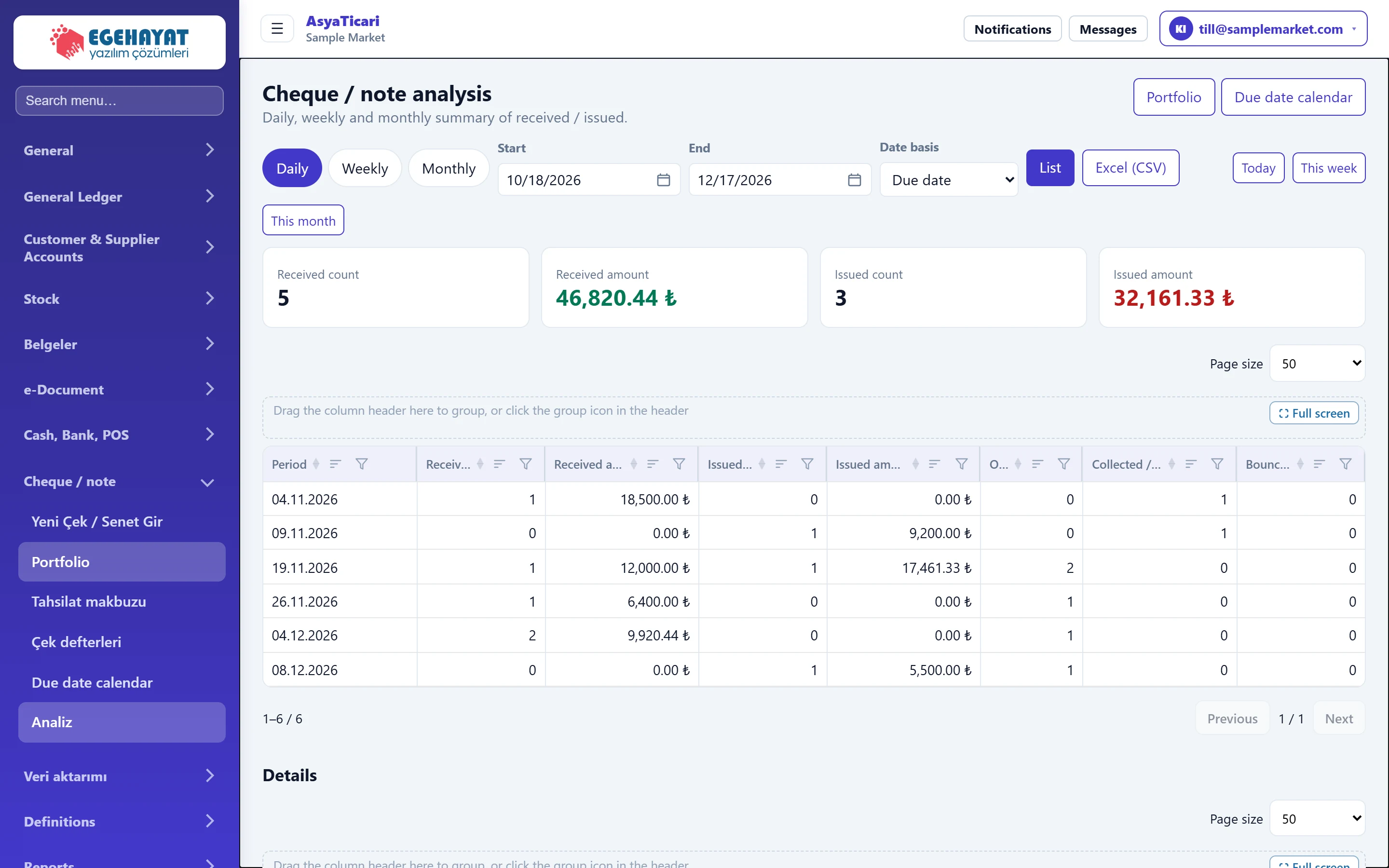
- 1Period Grouping: Daily, Weekly, Monthly.
- 2Totals Received and issued counts / amounts in the range.
- 3Summary table Summary per period.
- 4Details All cheques / notes in the range.
Filters

- 1Daily Day by day.
- 2Weekly Week by week.
- 3Monthly Month by month.
- 4List Recalculates with the filters.
- 5Excel (CSV) Downloads the summary table as CSV (opens in Excel).
- 6Quick range Quick range: today, this week, this month.
| Field | Sign in | Description |
|---|---|---|
| Start | Text | First day of the range; defaults to 30 days ago. Placeholder: «mm/dd/yyyy» |
| End | Text | Last day of the range; defaults to 30 days ahead. Placeholder: «mm/dd/yyyy» |
| Date basis | Choice list | Due date: groups by due date; Transaction date: by issue / transaction date. Options: Due date · Issue date |
The Received count, Received amount, Issued count and Issued amount cards at the top are the totals of the range.
Summary table
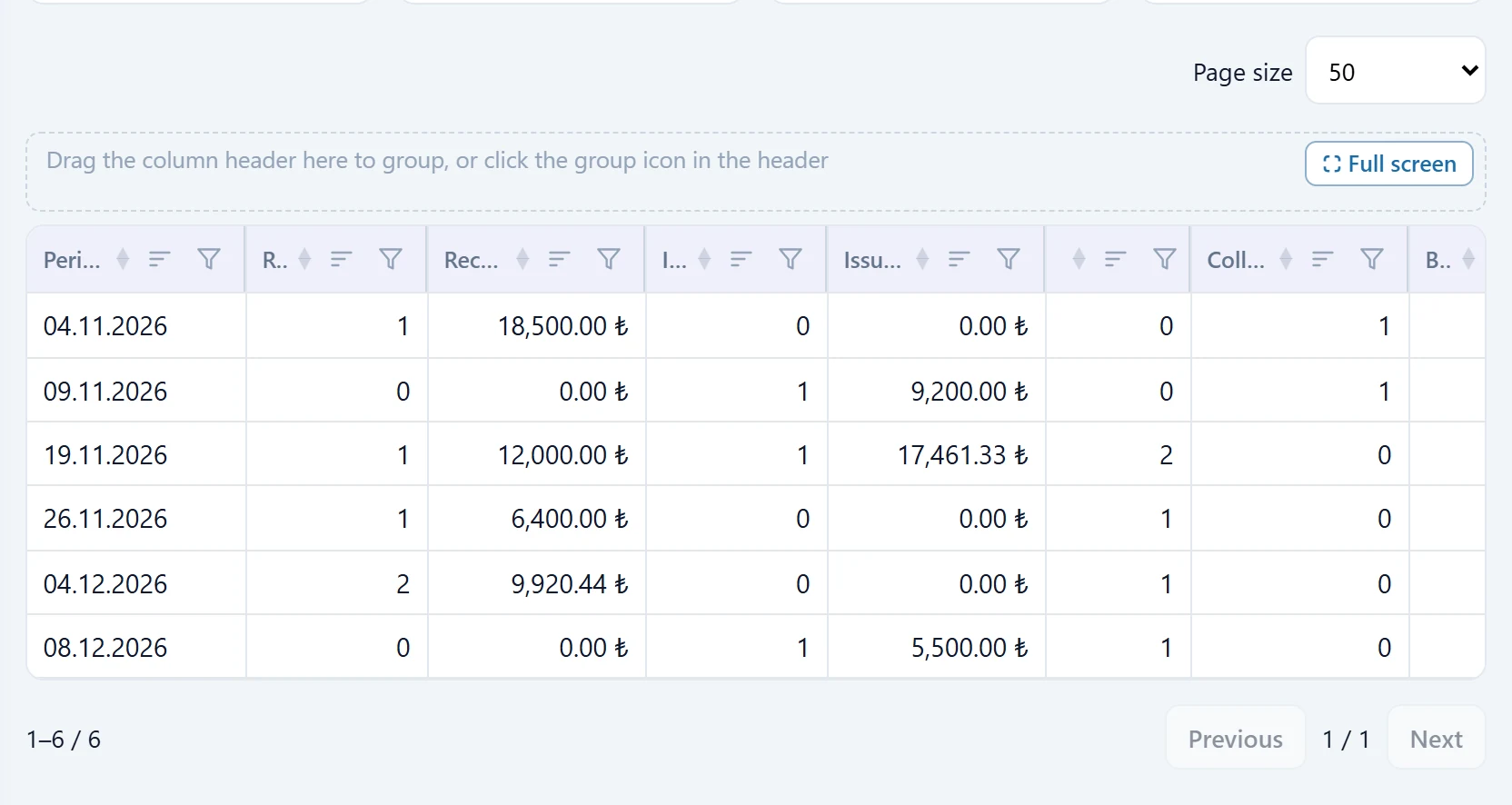
- 1Period Day, week or month.
- 2Received count Number of cheques / notes received in that period.
- 3Issued count Number of cheques / notes issued in that period.
Columns: Period, Received count, Received amount, Issued count, Issued amount, Open, Collected / paid, Bounced. The Details table below lists every cheque / note in the range with direction, type, serial, account, due date, transaction date, amount, currency and status.
Step by step: monthly summary
- Choose the Monthly tab.
- Enter Start and End (e.g. the first and last day of the year).
- Choose the Date basis: Due date to group by due date, the issue / transaction date to group by when items were received / issued.
- Click List.
- To use the table elsewhere, download it with Excel (CSV).
The quick range buttons on the right (today, this week, this month) set the range with one click.
Common messages
| Message (as shown on screen) | Cause | Solution |
|---|---|---|
| No records in the selected period. | Nothing in the range for the chosen date basis. | Widen the range or change the Date basis. |
| No detail. | Nothing to show in the detail table. | Widen the range. |