
 AsyaTicari
 AsyaRestoran
 AsyaOtel
 AsyaCrm
 AsyaKlinik
 AsyaSpor
 AsyaSSH
 AsyaEmlak
 AsyaFilo
 AsyaPuantaj
 AsyaİSG
 AsyaİHD
 Kolay Öğren
AsyaKlinik · Specialty screens
Pregnancy follow-up
Pregnancy episode, antenatal protocol, visit records, risk / Rh monitoring, birth record and mother's card.
On the Pregnancy follow-up screen you open the patient's pregnancy as an episode, record every check-up as a Prenatal visit, monitor risks and Rh incompatibility, and close the episode at delivery.
This screen is in the menu only if the Obstetrics & Gynecology branch is enabled for the company. Branches are enabled by the platform administrator; if the branch is off, the screen shows «This screen is not enabled in your company.»
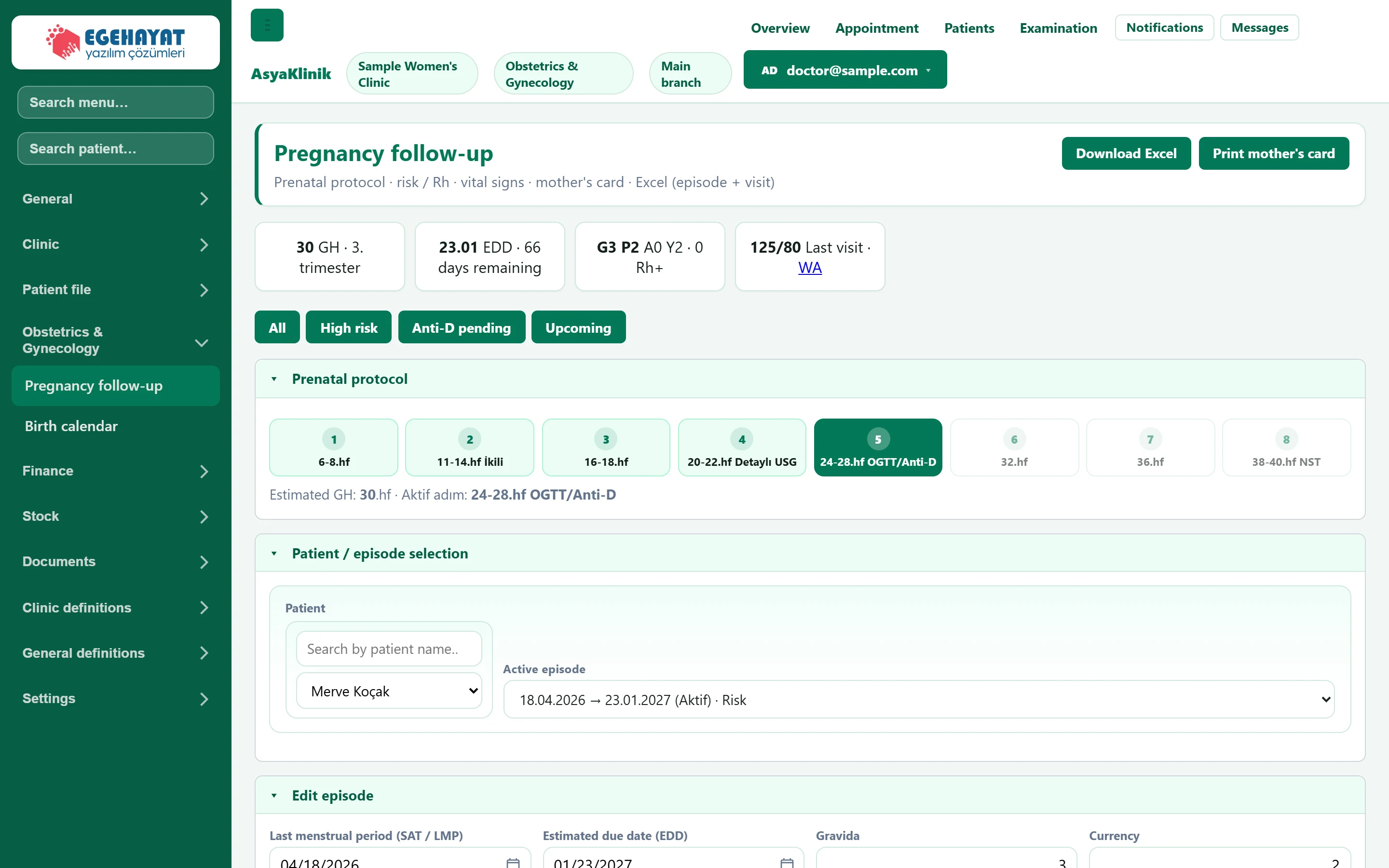
- 1Excel / Mother's card Exports episodes and visits to Excel; prints the mother's follow-up card.
- 2Summary cards Gestational week, estimated due date, G/P/A/L and last visit.
- 3Episode filter Filters the episode list by high risk, awaiting Anti-D or upcoming delivery.
- 4Antenatal protocol The check-up step matching the gestational week is highlighted.
- 5Patient / episode Select the patient first, then the pregnancy episode.
The cards at the top show the selected episode's gestational week (GH) and trimester, the estimated due date (EDD) and days remaining, the G/P/A/L counts with the Rh information, and the blood pressure of the last visit. If the patient's phone is recorded, the WA link opens WhatsApp.
Antenatal protocol
The protocol strip shows the standard check-up steps from week 6-8 to week 38-40. The step matching the estimated gestational week is dark; completed steps are shown in a lighter colour.
Patient and episode selection
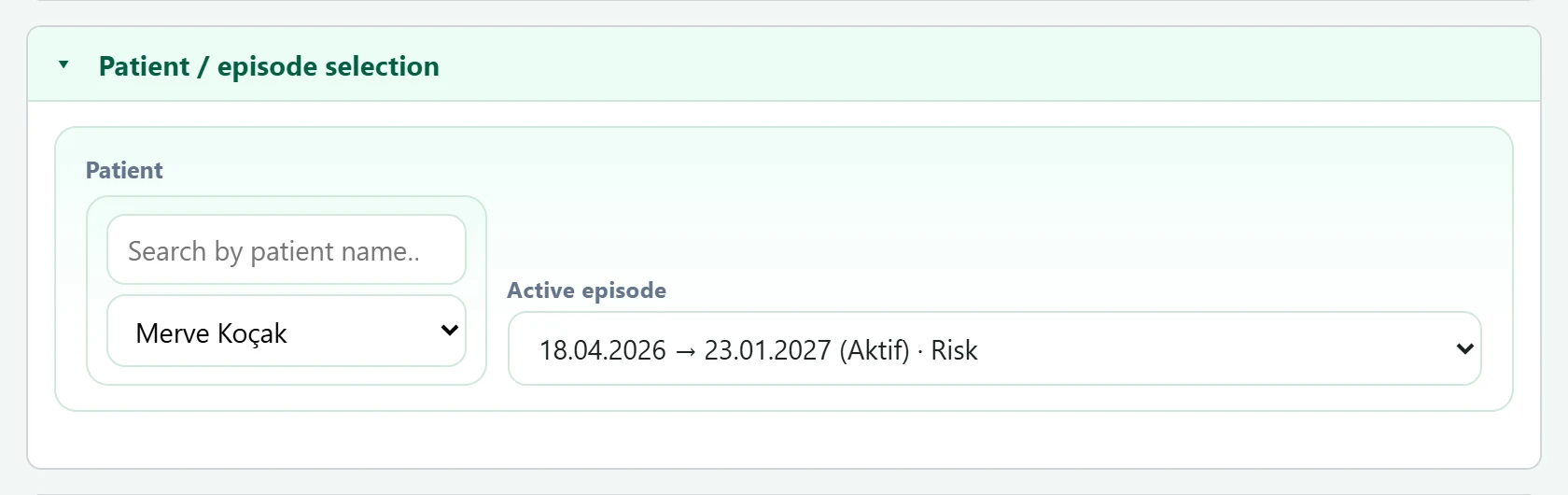
| Field | Sign in | Description |
|---|---|---|
| Patient | Search | Type a name in the top box to narrow the list, then choose the patient below. Placeholder: «Search by patient name…» |
| Active episode | Choice list | The patient's pregnancy episodes (LMP → due date, status). Leave empty to open a new episode. Options: New / select · 18.04.2026 → 23.01.2027 (Aktif) · Risk |
Episode details
If no episode is selected, the panel opens empty as New pregnancy episode; if one is selected it becomes Edit episode.
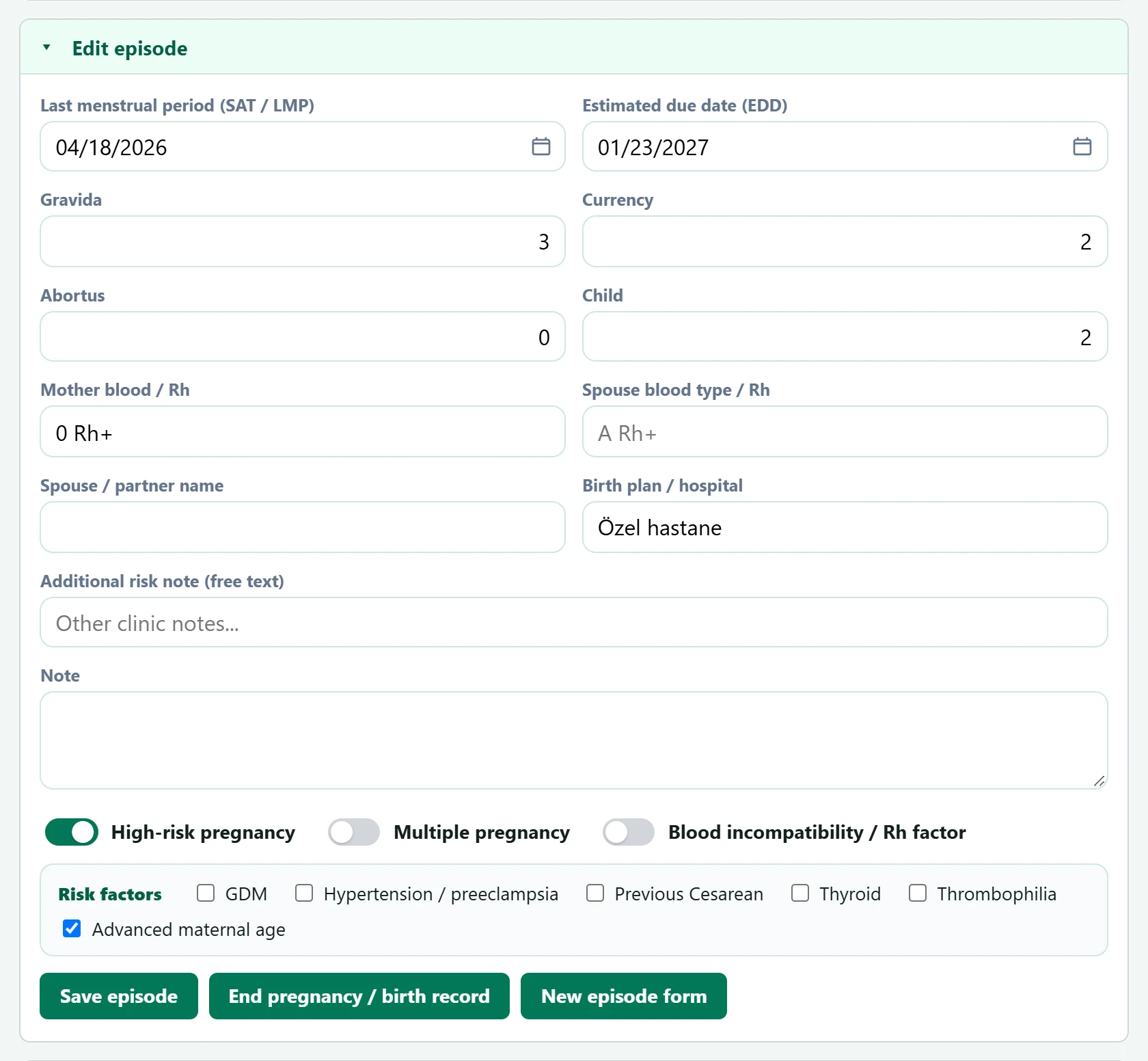
- 1Save episode Saves the episode (opens it if new).
- 2End pregnancy / birth record Opens the delivery / termination record window.
| Field | Sign in | Description |
|---|---|---|
| Last menstrual period (SAT / LMP) | Text | First day of the last menstrual period. If the due date is empty, it is filled by adding 280 days and the gestational week is calculated. Placeholder: «mm/dd/yyyy» |
| Estimated due date (EDD) | Text | Estimated due date; shown on this day in the birth calendar. Placeholder: «mm/dd/yyyy» |
| Gravida | Text | Total number of pregnancies (including this one). |
| Currency | Text | Number of births. |
| Abortus | Text | Number of miscarriages / terminated pregnancies. |
| Child | Text | Number of living children. |
| Mother blood / Rh | Text | Mother's blood group (e.g. «A Rh-»). Placeholder: «A Rh-» |
| Spouse blood type / Rh | Text | Partner's blood group. If the mother is Rh− and the partner Rh+, a warning appears and Rh monitoring is ticked automatically. Placeholder: «A Rh+» |
| Spouse / partner name | Text | Partner's name; shown on the mother's card. |
| Birth plan / hospital | Text | Hospital planned for the delivery, or a birth plan note. |
| Additional risk note (free text) | Text | Any other risk information not in the list. Placeholder: «Other clinic notes...» |
| Note | Long text | Free note on the episode. |
| High-risk pregnancy | Checkbox | Marks the episode as high risk; it then appears under the «High risk» filter and with a badge in the birth calendar. |
| Multiple pregnancy | Checkbox | Twin / multiple pregnancy. Ticking it also ticks high risk. |
| Blood incompatibility / Rh factor | Checkbox | Rh incompatibility monitoring; used for Anti-D follow-up. |
| GDM | Checkbox | Gestational diabetes. Ticking any risk factor ticks high risk automatically. |
| Hypertension / preeclampsia | Checkbox | High blood pressure or pre-eclampsia in pregnancy. |
| Previous Cesarean | Checkbox | Previous caesarean delivery. |
| Thyroid | Checkbox | Thyroid disease. |
| Thrombophilia | Checkbox | Clotting disorder. |
| Advanced maternal age | Checkbox | Advanced maternal age risk. |
If the mother's blood group is Rh− and the partner's Rh+, the warning «Mother Rh− and spouse Rh+ — blood incompatibility / Rh monitoring recommended.» appears and Rh monitoring is ticked automatically. Ticking any risk factor or multiple pregnancy also ticks High-risk pregnancy.
Prenatal visit
To add a visit, first select or open an episode.
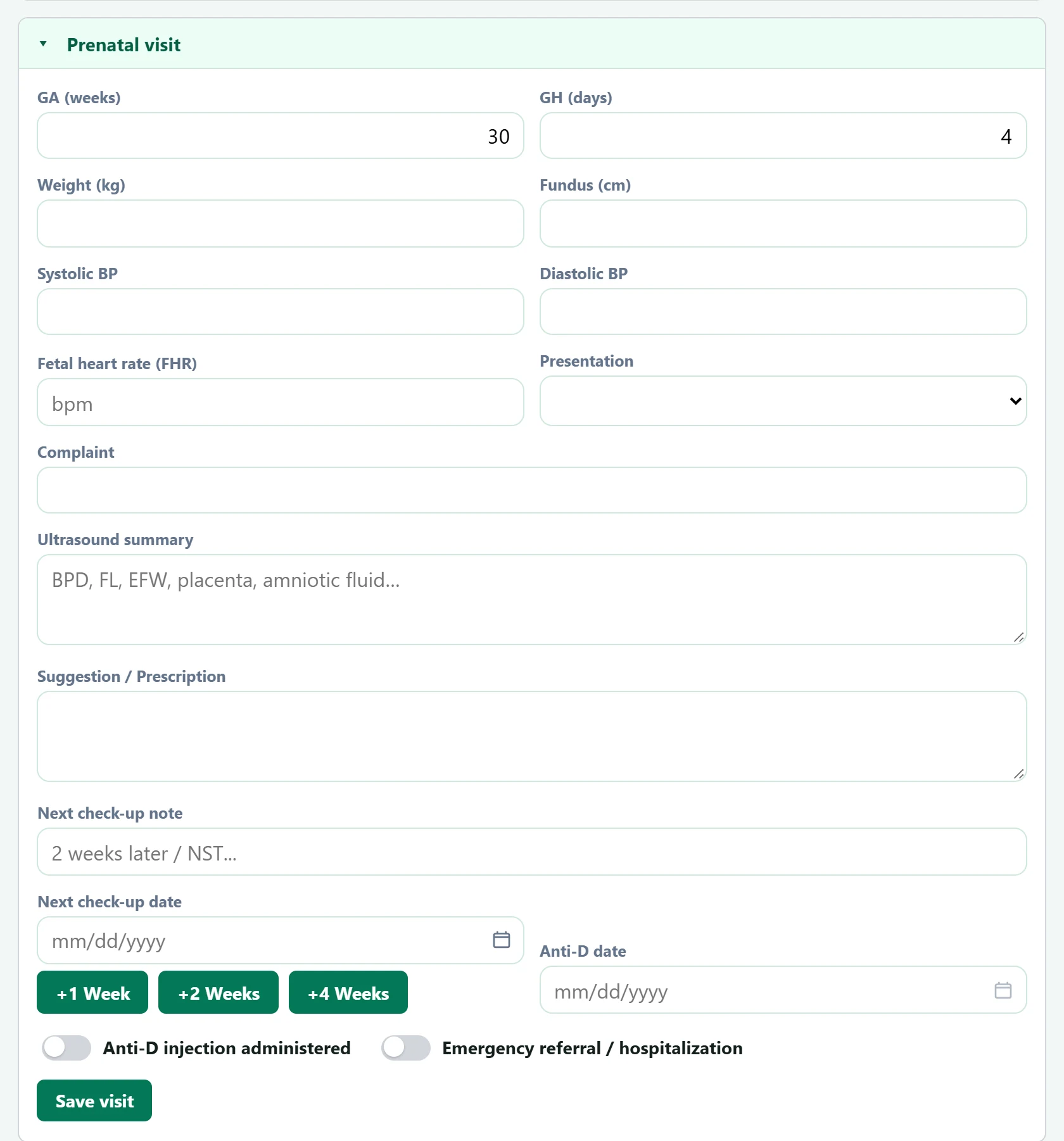
- 1Save visit Saves the visit.
| Field | Sign in | Description |
|---|---|---|
| GA (weeks) | Text | Gestational week on the visit day; filled automatically if the LMP is entered. |
| GH (days) | Text | Day of the week (0–6). |
| Weight (kg) | Text | Mother's weight. |
| Fundus (cm) | Text | Fundal height. |
| Systolic BP | Text | Systolic blood pressure. |
| Diastolic BP | Text | Diastolic blood pressure. |
| Fetal heart rate (FHR) | Text | Fetal heart rate (bpm). Placeholder: «bpm» |
| Presentation | Choice list | Fetal presentation (cephalic, breech, transverse…). Options: Cephalic · Breech · Transverse · Oblik · Undefined |
| Complaint | Text | The mother's complaint at this visit. |
| Ultrasound summary | Long text | Ultrasound measurements and findings (BPD, FL, EFW, placenta, fluid). Placeholder: «BPD, FL, EFW, placenta, amniotic fluid…» |
| Suggestion / Prescription | Long text | Advice and medication given. |
| Next check-up note | Text | What to do at the next check-up (e.g. «NST»). Placeholder: «2 weeks later / NST...» |
| Next check-up date | Text | Next check-up date; the +1 / +2 / +4 week buttons fill it counting from today. Placeholder: «mm/dd/yyyy» |
| Anti-D date | Text | Day the Anti-D injection was given; enabled only while «Anti-D injection given» is ticked. Placeholder: «mm/dd/yyyy» |
| Anti-D injection administered | Checkbox | When ticked, the Anti-D date is filled with today. |
| Emergency referral / hospitalization | Checkbox | Tick if there was an emergency referral or admission at this visit. |
Visit history
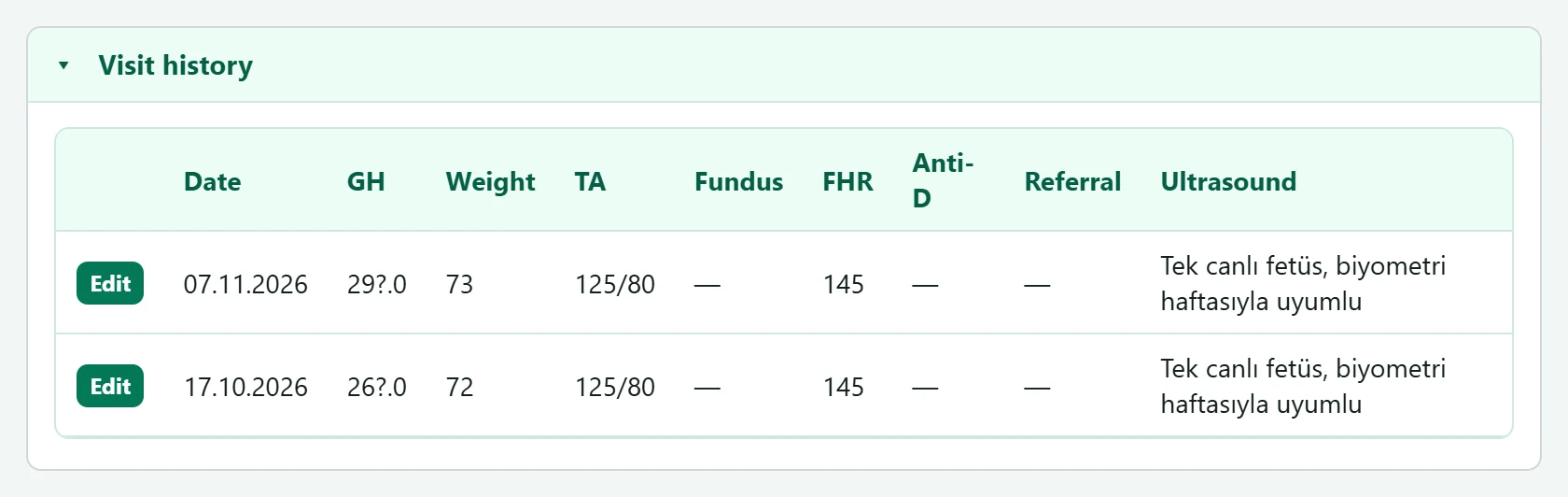
- 1Edit Loads the visit into the form for editing.
Edit on a row loads the visit into the form above; the button becomes Update visit, and New visit returns to an empty form.
End pregnancy / birth record
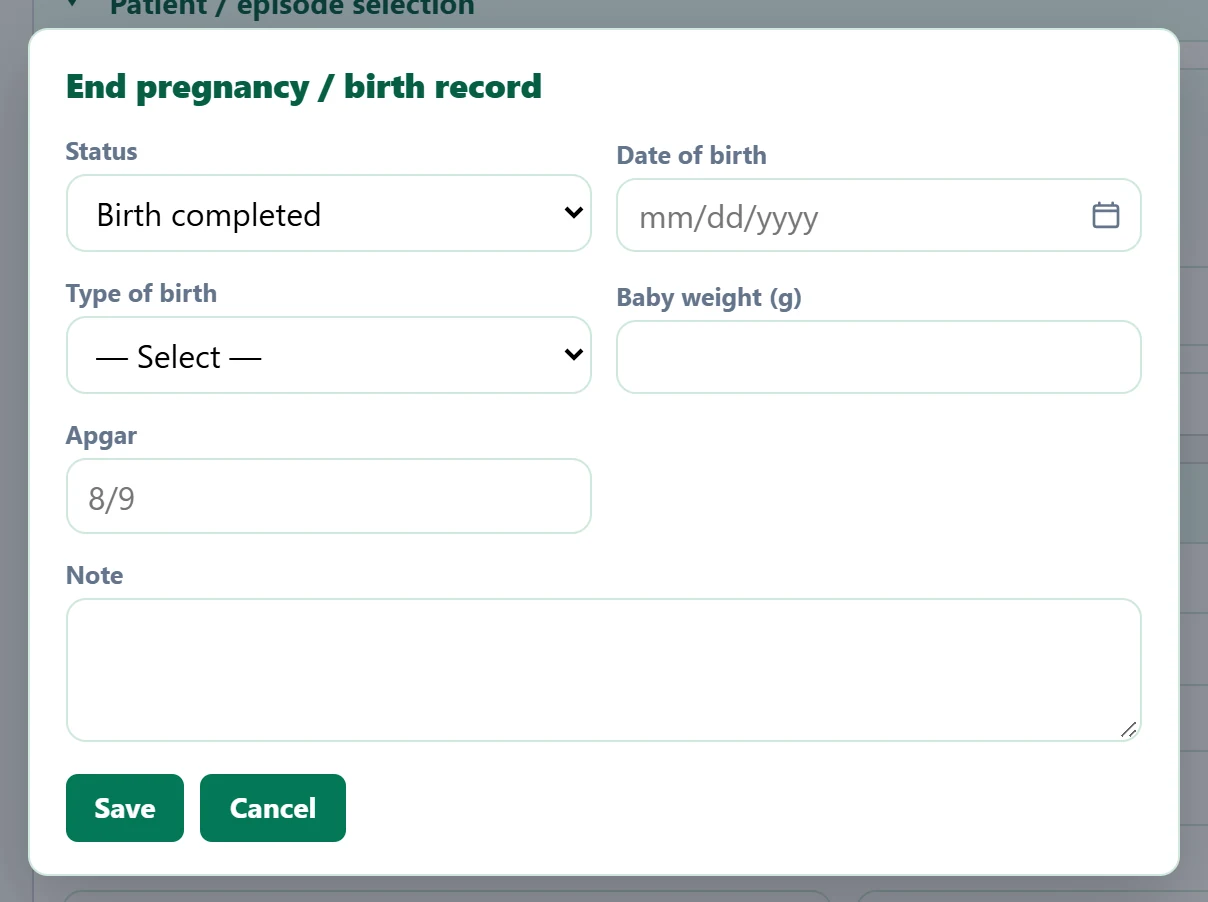
| Field | Sign in | Description |
|---|---|---|
| Status | Choice list | Completed with delivery, abortion, follow-up completed or Active (undo). Options: Birth completed · Abortus / pregnancy termination · Tracking completed · Activate (undo) |
| Date of birth | Text | Date of delivery / termination. Placeholder: «mm/dd/yyyy» |
| Type of birth | Choice list | Normal spontaneous delivery (NSD) or caesarean. Options: — Select — · Normal spontaneous delivery (NSD) · Cesarean section |
| Baby weight (g) | Text | Birth weight (grams). |
| Apgar | Text | Apgar score (e.g. 8/9). Placeholder: «8/9» |
| Note | Long text | Note on the delivery. |
Step by step
- Select the patient in the Patient / episode selection panel.
- For a new pregnancy leave the episode empty, enter the LMP, tick the risk information and press Open episode.
- At each check-up fill in the Prenatal visit panel and press Save visit; set the next check-up with +1 / +2 / +4 weeks.
- At delivery record the status and birth details with End pregnancy / birth record.
- Print mother's card prints the card with identity, risks and the visit table; Download Excel exports episodes and visits.
Common messages
| Message | Cause | Solution |
|---|---|---|
| Select a patient. | Saving without a patient. | Select the patient in the patient / episode panel. |
| Select episode. | A visit or status was saved without an episode. | Select or open an episode first. |
| Episode status updated. | The termination / birth record was saved. | Information only. |